



Which Protocol Is Commonly Used for Network Monitoring?
Question:
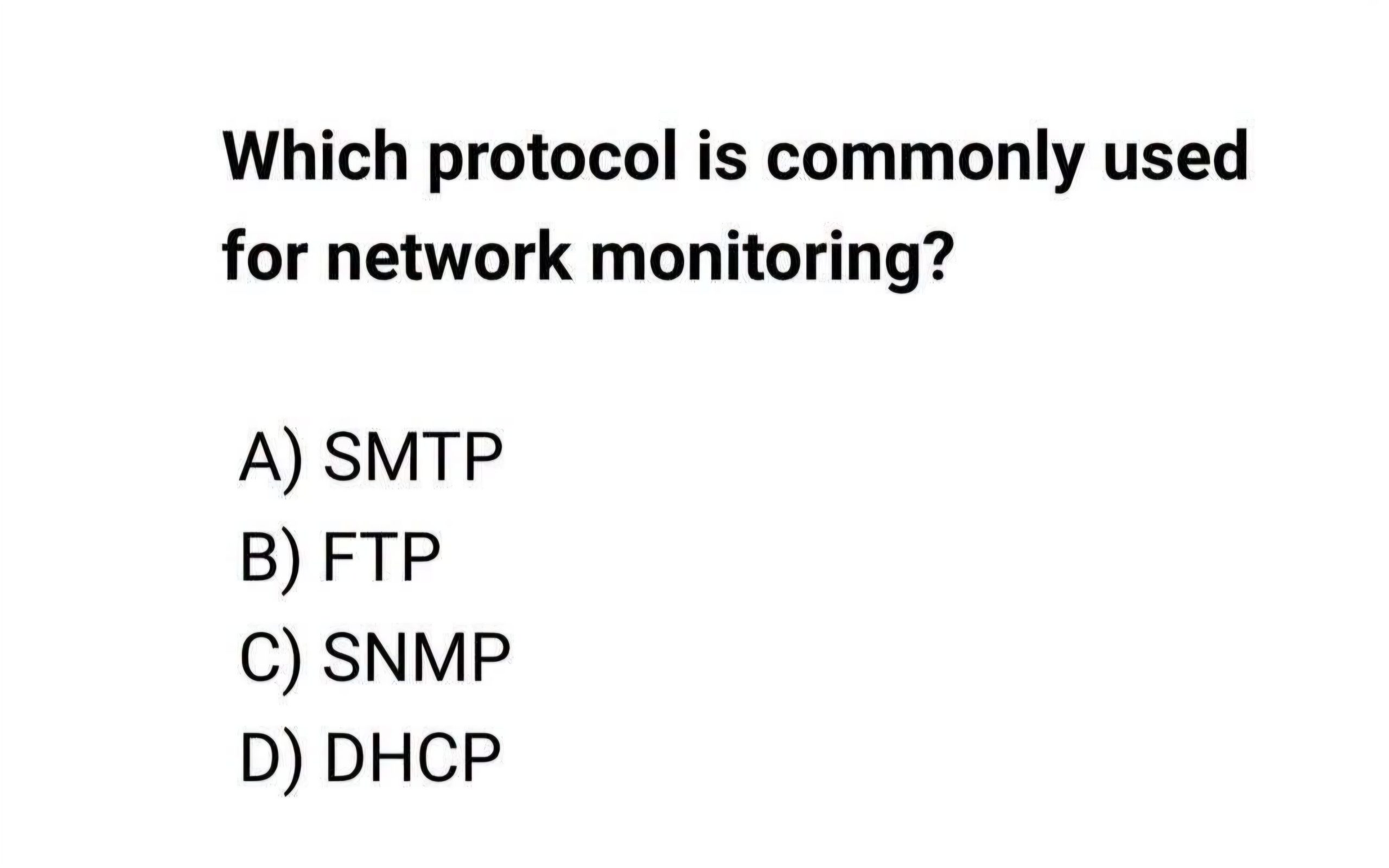
Which protocol is commonly used for network monitoring?
A) SMTP
B) FTP
C) SNMP
D) DHCP
Correct Answer: C) SNMP (Simple Network Management Protocol)
Introduction
Modern computer and telecommunications networks consist of thousands of interconnected devices, including routers, switches, firewalls, servers, wireless access points, microwave radios, optical transmission equipment, and mobile base stations. To ensure these devices operate efficiently and reliably, network administrators require a standardized method of monitoring their performance, detecting faults, collecting statistics, and remotely managing equipment. The protocol that has become the industry standard for these tasks is the Simple Network Management Protocol (SNMP).
SNMP is one of the most important protocols in network management because it allows administrators to monitor the health and status of network devices in real time without physically accessing them. It plays a critical role in enterprise networks, Internet Service Providers (ISPs), data centers, cloud infrastructure, and telecommunications systems such as LTE, 5G, microwave transmission, and fiber-optic networks.
Although SMTP, FTP, and DHCP are also essential networking protocols, they serve entirely different purposes. Understanding the functions of each protocol helps networking professionals select the correct protocol for a particular application.
What Is SNMP?
SNMP (Simple Network Management Protocol) is an application-layer protocol used for monitoring, managing, and collecting information from network-connected devices.
It allows a central management system to communicate with network devices and gather operational information such as:
- CPU utilization
- Memory usage
- Interface status
- Network traffic
- Temperature
- Power supply status
- Fan operation
- Error counters
- Alarm conditions
- Device uptime
SNMP enables proactive maintenance by allowing administrators to identify problems before they affect users.
Why SNMP Is Important
Without SNMP, administrators would need to log into every individual router, switch, or server to check its condition.
In large organizations containing thousands of devices, this would be impossible.
SNMP automates the process by continuously collecting information from all monitored devices.
Benefits include:
- Centralized monitoring
- Faster fault detection
- Reduced downtime
- Better network performance
- Historical performance analysis
- Automated alerts
- Simplified troubleshooting
For these reasons, nearly every modern network management platform supports SNMP.
How SNMP Works
SNMP operates using a client-server model.
Three main components are involved:
1. SNMP Manager
The SNMP Manager is the central monitoring system.
It performs functions such as:
- Polling devices
- Receiving alarms
- Displaying network status
- Generating reports
- Recording historical data
Examples of SNMP managers include:
- SolarWinds Network Performance Monitor
- PRTG Network Monitor
- Zabbix
- Nagios
- LibreNMS
- ManageEngine OpManager
The manager communicates with all monitored devices across the network.
2. SNMP Agent
An SNMP Agent is software running inside the monitored device.
Examples include:
- Routers
- Switches
- Firewalls
- Wireless controllers
- Servers
- Printers
- UPS systems
- Microwave radios
- Optical transmission equipment
The agent collects local performance information and responds to requests from the SNMP manager.
3. Management Information Base (MIB)
The MIB is a structured database containing information about device parameters.
Each monitored value has a unique Object Identifier (OID).
Examples include:
- System name
- Device location
- Interface speed
- CPU utilization
- Temperature
- Fan speed
- Power supply voltage
The SNMP manager requests specific OIDs from the agent to retrieve desired information.
SNMP Communication Process
The communication process is straightforward.
- The SNMP manager sends a request.
- The SNMP agent receives the request.
- The agent retrieves the requested information from the MIB.
- The agent sends the response back to the manager.
The entire process occurs within milliseconds.
SNMP Operations
SNMP supports several basic operations.
GET
Retrieves information from a device.
Example:
“What is the current CPU usage?”
GET NEXT
Retrieves the next available object within the MIB.
Useful when walking through large tables.
GET BULK
Retrieves multiple MIB objects simultaneously.
This improves efficiency on large networks.
SET
Changes configuration values remotely.
Example:
Changing the device contact name.
Many organizations disable SET operations for security reasons.
TRAP
A Trap is an unsolicited notification sent automatically by the SNMP agent.
Examples include:
- Link failure
- Power failure
- High CPU usage
- Temperature alarm
- Device reboot
Traps allow administrators to respond immediately to network problems.
INFORM
Similar to a Trap but requires acknowledgment from the manager.
This provides more reliable event notification.
SNMP Versions
Several versions of SNMP exist.
SNMP Version 1
The original version.
Characteristics:
- Simple implementation
- Community-string authentication
- No encryption
Although widely used historically, Version 1 has significant security limitations.
SNMP Version 2c
Introduced performance improvements.
Features include:
- Faster communication
- Bulk transfers
- Better error handling
However, authentication still relies on community strings.
SNMP Version 3
SNMPv3 is the most secure version.
Features include:
- User authentication
- Encryption
- Message integrity
- Access control
Most modern organizations prefer SNMPv3 because of its improved security.
Devices That Support SNMP
Nearly every professional networking device supports SNMP.
Examples include:
- Routers
- Layer 2 switches
- Layer 3 switches
- Firewalls
- Servers
- Storage systems
- Load balancers
- Wireless access points
- Microwave radios
- Optical transmission equipment
- Cellular base stations
- UPS systems
- Environmental monitoring systems
This universal compatibility makes SNMP the standard protocol for network monitoring.
SNMP in Telecommunications
Telecommunications operators rely heavily on SNMP.
It is commonly used to monitor:
- Microwave links
- Optical DWDM systems
- SDH equipment
- MPLS routers
- LTE eNodeBs
- 5G gNodeBs
- Baseband Units
- Radio Units
- Core network devices
Network Operation Centers (NOCs) continuously collect SNMP information from thousands of devices.
Typical monitored parameters include:
- Received Signal Level (RSL)
- Bit Error Rate (BER)
- Temperature
- Fan status
- DC voltage
- Optical power
- Ethernet traffic
- Alarm status
This information enables engineers to maintain high network availability.
Advantages of SNMP
SNMP offers numerous benefits.
Centralized Monitoring
Thousands of devices can be monitored from one location.
Vendor Independence
Most networking manufacturers support SNMP.
Examples include:
- Cisco
- Huawei
- Juniper
- Nokia
- Ericsson
- ZTE
- MikroTik
- Fortinet
Low Bandwidth Usage
SNMP exchanges only small amounts of information.
It has minimal impact on network performance.
Real-Time Monitoring
Administrators receive immediate updates regarding equipment status.
Historical Reporting
Collected information can be stored for weeks or years.
Historical trends help identify capacity problems.
Automation
SNMP allows automatic alarm generation whenever abnormal conditions occur.
Limitations of SNMP
Despite its advantages, SNMP has some limitations.
These include:
- Limited configuration capabilities
- Security concerns in older versions
- Vendor-specific MIB differences
- Polling intervals may delay fault detection
Nevertheless, it remains the most widely used monitoring protocol.
Understanding the Other Answer Choices
A) SMTP
SMTP stands for Simple Mail Transfer Protocol.
Its purpose is sending email between mail servers.
SMTP is responsible for:
- Sending emails
- Relaying mail
- Outgoing mail delivery
SMTP does not perform network monitoring.
B) FTP
FTP stands for File Transfer Protocol.
Its primary purpose is transferring files between computers.
FTP allows users to:
- Upload files
- Download files
- Manage directories
Although network administrators sometimes use FTP for software upgrades and backups, it is not designed for monitoring network devices.
D) DHCP
DHCP stands for Dynamic Host Configuration Protocol.
DHCP automatically assigns:
- IP addresses
- Subnet masks
- Default gateways
- DNS server addresses
Without DHCP, administrators would need to configure every computer manually.
DHCP simplifies network administration but has no monitoring function.
Comparison of the Four Protocols
| Protocol | Full Name | Primary Purpose |
|---|---|---|
| SMTP | Simple Mail Transfer Protocol | Sending email |
| FTP | File Transfer Protocol | Transferring files |
| SNMP | Simple Network Management Protocol | Monitoring and managing network devices |
| DHCP | Dynamic Host Configuration Protocol | Automatic IP address assignment |
From this comparison, it is clear that SNMP is the protocol specifically designed for network monitoring and management.
Practical Example
Consider a telecommunications company operating several hundred microwave transmission sites.
Each microwave radio supports SNMP.
The Network Management System polls every device every five minutes.
During normal operation, the system collects:
- Received Signal Level (RSL)
- Temperature
- Power supply voltage
- Ethernet traffic
- Error counters
- CPU utilization
One afternoon, heavy rainfall causes the RSL on a microwave link to decrease rapidly.
The microwave radio immediately sends an SNMP Trap indicating:
- Low RSL
- Increased Bit Error Rate
- Adaptive modulation activated
The Network Operations Center receives the alarm instantly.
Engineers monitor the link until weather conditions improve.
Without SNMP, this degradation might not be detected until users reported service interruptions.
Best Practices for Using SNMP
Network engineers should follow several best practices when deploying SNMP.
These include:
- Use SNMPv3 whenever possible.
- Configure strong authentication credentials.
- Enable encryption.
- Restrict SNMP access using Access Control Lists (ACLs).
- Disable unused community strings.
- Monitor critical interfaces continuously.
- Configure Trap notifications for major alarms.
- Document MIB objects used in monitoring.
- Regularly update network management software.
- Review historical trends to predict capacity upgrades.
Following these practices improves network security, reliability, and operational efficiency.
Conclusion
Among the four options—SMTP, FTP, SNMP, and DHCP—the correct answer is C) SNMP (Simple Network Management Protocol). SNMP is the industry-standard protocol for monitoring, managing, and collecting operational information from network-connected devices. It enables administrators to supervise routers, switches, servers, firewalls, microwave radios, optical transmission equipment, and mobile network infrastructure from a centralized management system. Through components such as the SNMP Manager, SNMP Agent, and Management Information Base (MIB), the protocol provides real-time visibility into device performance, interface statistics, alarms, environmental conditions, and network health. Features such as GET, SET, TRAP, and INFORM operations make SNMP an indispensable tool for proactive network management. While SMTP is used for email transmission, FTP for file transfers, and DHCP for automatic IP address assignment, only SNMP is specifically designed to monitor and manage network infrastructure. As a result, SNMP remains one of the most essential protocols for maintaining reliable, secure, and efficient enterprise and telecommunications networks.